
.
Sensor de luz LDR y arduino
Indice
- Led enciande segun estado del sensor LDR
- .Mostrar el valor del sensor LDR en una pantala lcd
1.Led enciande segun estado del sensor LDR.
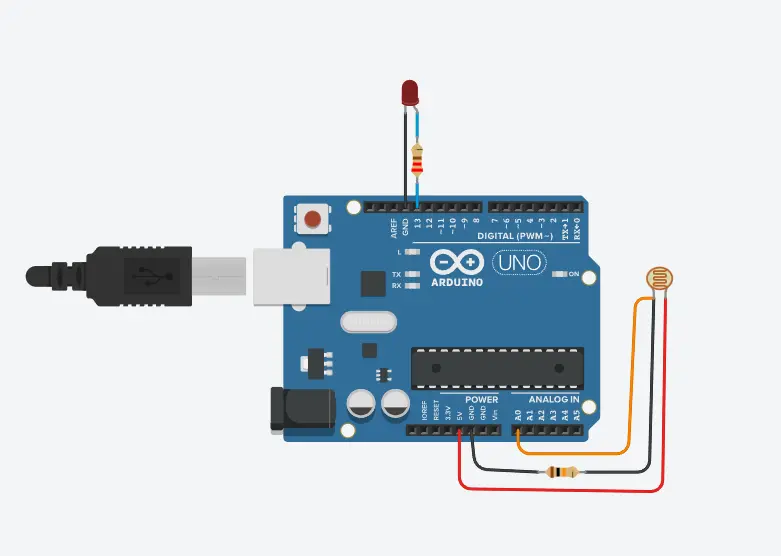
// ============ DEFINICIÓN DE PINES ============
const int LIGHT_SENSOR_PIN = A0;  // Pin del sensor de luz
const int LED_PIN = 13;           // Pin del LED

// ============ CONSTANTES ============
const int ANALOG_THRESHOLD = 500;  // Umbral de luz (0-1023)

// ============ VARIABLES ============
int analogValue;  // Valor leído del sensor

// ============ CONFIGURACIÓN ============
void setup() {
  pinMode(LED_PIN, OUTPUT);  // LED como salida
}

// ============ BUCLE PRINCIPAL ============
void loop() {
  analogValue = analogRead(LIGHT_SENSOR_PIN);  // Leer sensor

  if(analogValue < ANALOG_THRESHOLD) {         // Si está oscuro
    digitalWrite(LED_PIN, HIGH);               // Enciende LED
  } else {                                      // Si está claro
    digitalWrite(LED_PIN, LOW);                // Apaga LED
  }
}
2. Mostrar el valor del sensor LDR en una pantala lcd
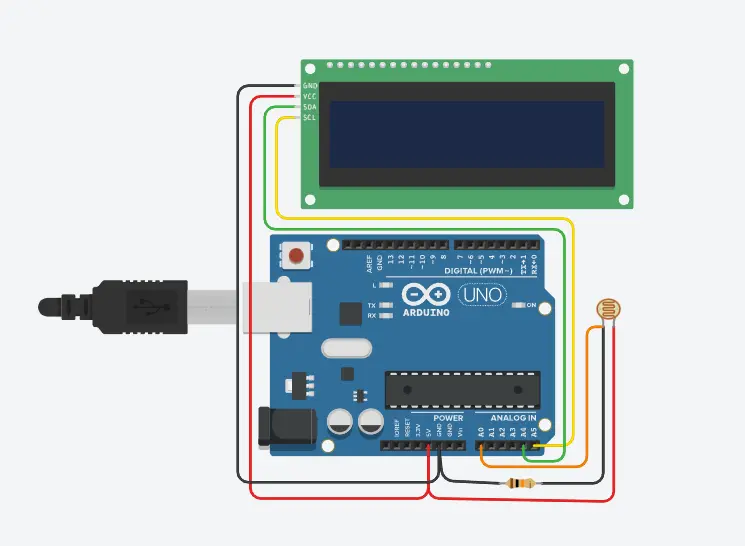
// ============ BIBLIOTECAS ============
#include <Wire.h>          // Librería para comunicación I2C
#include <LiquidCrystal_I2C.h>  // Librería para LCD con módulo I2C

// ============ DEFINICIÓN DE PINES ============
const int LIGHT_SENSOR_PIN = A0;  // Pin del sensor de luz

// ============ CONFIGURACIÓN LCD ============
// Dirección I2C común: 0x27 o 0x3F, 16 columnas, 2 filas
LiquidCrystal_I2C lcd(0x27, 16, 2);  // Prueba con 0x3F si no funciona

// ============ CONSTANTES ============
const int ANALOG_THRESHOLD = 500;  // Umbral de luz (0-1023)

// ============ VARIABLES ============
int analogValue;        // Valor leído del sensor (0-1023)
int porcentaje;         // Valor convertido a porcentaje (0-100%)

// ============ CONFIGURACIÓN INICIAL ============
void setup() {
  lcd.init();           // Inicializar LCD
  lcd.backlight();      // Encender retroiluminación
  lcd.setCursor(0, 0);  // Posición columna 0, fila 0
  lcd.print("Luz:");    // Texto fijo
}

// ============ BUCLE PRINCIPAL ============
void loop() {
  // Leer sensor (0 = oscuro, 1023 = claro)
  analogValue = analogRead(LIGHT_SENSOR_PIN);

  // Convertir a porcentaje (0-100%)
  porcentaje = map(analogValue, 0, 1023, 0, 100);

  // Mostrar en LCD
  lcd.setCursor(0, 1);              // Fila 2, columna 0
  lcd.print("        ");            // Borrar línea anterior
  lcd.setCursor(0, 1);              // Volver al inicio
  lcd.print(porcentaje);            // Mostrar porcentaje
  lcd.print("%  ");                 // Mostrar símbolo %

  // Mostrar valor raw (opcional)
  lcd.setCursor(8, 0);              // Columna 8, fila 0
  lcd.print(analogValue);           // Valor original
  lcd.print("   ");                 // Espacios para borrar
}